

Transparent payment pricing reduces surprise fees, raises conversion rates, and builds the repeat-purchase trust that keeps customers coming back. Merchants who surface all-in totals early — shipping, taxes, and processing costs included — consistently see fewer abandoned carts, stronger average order values (AOV), and lower chargeback rates. Industry guidance from Salesforce recommends making pricing, renewal dates, and capabilities easy for customers to understand as a foundational strategy. Practitioner results back that up: removing surprise fees and surfacing totals earlier has produced conversion improvements in the 15–25% range in documented case examples.
The three benefits merchants notice first:
- Fewer abandoned carts. Shoppers who see the full cost before checkout are far less likely to bail when the final number appears.
- Higher AOV. Predictable totals reduce hesitation, so customers add more to their cart without fearing a surprise at payment.
- Stronger trust and loyalty. Buyers who feel respected at checkout return. Repeat customers cost less to retain and spend more per order over time.
Pro Tip: Before making any changes to your checkout, run a quick audit of your current cart abandonment rate. That baseline number is the single most useful before/after comparison you will have.
Key Takeaways
Transparent payment pricing is the single most reliable lever for reducing cart abandonment and building the repeat-purchase trust that drives long-term e-commerce revenue.
| Point | Details |
|---|---|
| Show all-in totals early | Display estimated shipping, tax, and fees on the product page, not just at checkout confirmation. |
| Pin the order summary | A sticky, persistent order summary through every checkout step prevents last-step abandonment. |
| Measure conversion and AOV | Track cart abandonment rate, checkout conversion, and AOV as your primary before/after KPIs. |
| Run A/B tests by segment | Split new vs. returning customers and mobile vs. desktop to find where the transparency lift is largest. |
| Paysec enables fee-level clarity | Paysec's network offset pricing and real-time reporting give merchants the transaction detail needed for accurate customer-facing disclosure. |
Table of Contents
- What does transparent payment pricing mean for e-commerce?
- How transparent pricing benefits both customers and your business
- What are the key elements of a transparent checkout experience?
- How to implement transparent payment pricing: a step-by-step checklist
- How do you measure the impact of transparent pricing?
- Real-world examples of transparent pricing done right
- When can transparency backfire, and how do you manage the risk?
- What does implementation actually cost and how long does it take?
- How does your payment processor affect pricing transparency?
- The case for starting with transparency, not waiting for it
- Paysec gives merchants the tools to price with full clarity
- Sources
- FAQ
What does transparent payment pricing mean for e-commerce?
Transparent payment pricing means showing every mandatory charge — product price, shipping, applicable sales tax, and any payment processing surcharge — before the customer reaches the final confirmation screen. Nothing is added at the last step. Nothing is buried in fine print.
The contrast with opaque pricing is stark. Opaque checkout flows reveal shipping costs only after an address is entered, calculate tax only at the final step, and sometimes add a payment surcharge on the confirmation page. Each of those moments is a trust-breaking surprise. Transparent checkout eliminates them by calculating and displaying the all-in total as early as the product detail page (PDP) or the cart.
Consumers anchor on the first believable total they see. When that total grows unexpectedly at checkout, abandonment follows. Showing a credible all-in estimate early reduces drop-off and builds the confidence buyers need to complete a purchase.
Source: Enhance Sales with Transparent Pricing
Two trust standards underpin the technical side of this: PCI DSS (Payment Card Industry Data Security Standard) governs how card data is handled, and SOC 2 compliance covers how a payment service provider manages data security and availability. Merchants working with a provider that holds both certifications — like Paysec — can communicate those credentials to customers as additional proof that their payment data is protected. Understanding types of e-commerce payment processing fees is the first step toward knowing what to disclose.
| Feature | Transparent pricing | Opaque pricing |
|---|---|---|
| Shipping cost visibility | Shown on PDP or cart | Revealed after address entry |
| Tax calculation | Estimated early, confirmed at checkout | Added at final step only |
| Processing surcharge | Labeled and disclosed upfront | Hidden or added at confirmation |
| Order summary | Pinned and persistent through checkout | Collapsed or absent |
| Customer trust signal | High — no surprises | Low — frequent abandonment |
How transparent pricing benefits both customers and your business
The business case for clear pricing strategies is not theoretical. It shows up in conversion data, support ticket volume, and lifetime value metrics.
Customer-facing benefits:
- Predictable totals reduce cognitive friction. Buyers know what they owe before they commit.
- Lower return rates. When customers understand exactly what they are paying for, post-purchase regret drops.
- Fewer chargebacks. Surprise charges are one of the leading triggers for disputes. Eliminate the surprise, and dispute rates fall.
- Faster decisions. A shopper who trusts the price shown does not need to open a second tab to verify.
Business-facing benefits:
- Lower cart abandonment. The Baymard Institute consistently identifies unexpected extra costs as the top reason shoppers abandon carts.
- Higher conversion rate. Practitioner evidence shows conversion improvements of 15–25% after removing hidden fees and surfacing totals earlier.
- Improved LTV. Customers who complete a first purchase without friction are significantly more likely to return.
- Reduced support load. Pricing confusion drives inbound tickets. Transparent totals answer the question before it is asked.
Statistic callout: Practitioner case examples report 15–25% conversion uplifts after implementing transparent checkout flows that surface all-in totals earlier in the funnel.
Research from Mathematica on price transparency in healthcare found that transparency benefits consumer confidence even when buyers do not actively price-shop. The mechanism transfers directly to e-commerce: knowing the full cost reduces anxiety and increases purchase confidence, regardless of whether the shopper compares prices elsewhere.
What are the key elements of a transparent checkout experience?
Getting clear pricing right requires coordinated changes across copy, design, and engineering. The following elements form the core checklist.
Core disclosure elements:
- All-in price estimate on the PDP. Show a shipping estimate and tax estimate next to the product price, even before the customer adds to cart.
- Sticky order summary in cart and checkout. The running total should be visible at every step, not hidden behind a collapsed accordion.
- Clear shipping tier labels. "Standard (5–7 business days, $5.99)" is more trustworthy than "Standard Shipping."
- Honest tax disclosure. Show "Estimated tax: $X.XX — calculated by destination" rather than leaving a blank until the final step.
- Labeled surcharges. If a payment method carries a processing fee, label it explicitly: "Credit card processing fee: $0.XX."
- Currency and settlement clarity. For international customers, show the settlement currency and any conversion note.
Microcopy merchants can use near price, shipping, and the order button:
- Near the product price: "Estimated total with shipping and tax: $XX.XX"
- In the shipping selector: "Free standard shipping on orders over $50 — arrives in 5–7 business days"
- Above the order button: "Pay $XX.XX now — no hidden fees"
- At checkout confirmation: "Your price is locked. No additional charges will be applied."
UX rules that protect trust:
- Keep the coupon field unobtrusive so it does not signal to buyers that they are overpaying.
- Auto-apply any public discount codes rather than requiring manual entry.
- Lock the displayed price during the payment authentication step — a number that changes during 3DS verification destroys confidence.
- Show the final charge amount on the payment button itself, not just in the summary.
Pro Tip: Label the primary CTA button with the exact dollar amount: "Place Order — $47.83" outperforms "Place Order" in A/B tests because it removes the last moment of uncertainty before the customer commits.
How to implement transparent payment pricing: a step-by-step checklist
Implementation is a phased process. For merchants considering custom integrations when implementing transparency, exploring Fintech Software Development — Wealth, Payments & Regulated Rails | Bitrupt can provide valuable technical approaches to payment rails and integration. Start with the highest-impact, lowest-effort changes, then build toward full checkout transparency.
- Audit current leakage points. Run through your checkout as a new customer. Note every step where the displayed total changes or a new charge appears. These are your abandonment risks.
- Add an estimated all-in total to the PDP. Use your shipping zone data and a tax estimation API to show a realistic total before the customer adds to cart. Even a range ("$X.XX–$X.XX including shipping and tax") is better than nothing.
- Surface shipping and tax earlier. Move the shipping calculator to the cart page, not just checkout. Show estimated tax as soon as a zip code is available.
- Pin the order summary. Make the cart summary sticky in both the cart and multi-step checkout. Buyers should never have to scroll to see what they owe.
- Ensure the payment gateway displays the final total. The amount shown in your gateway's payment form must match the order summary exactly. Discrepancies at this step cause last-second abandonment.
- Label every fee explicitly. Processing surcharges, handling fees, and insurance add-ons each need a plain-language label and a dollar amount.
- Test on mobile. Sticky summaries and fee labels behave differently on small screens. Verify that totals remain visible throughout the mobile checkout flow.
- Run an A/B test. Split traffic between your current checkout and the transparent version. Measure cart abandonment rate, checkout conversion rate, and AOV as primary metrics. Run the test for at least two full business weeks to account for weekly traffic patterns.
U.S.-specific note: American e-commerce operates under destination-based sales tax rules. Unlike VAT, which is typically included in the displayed price in Europe, U.S. sales tax is calculated by the customer's shipping destination and added at checkout. The practical implication: show an estimated tax figure as early as the cart page (using the customer's entered zip code or a reasonable default), and confirm the exact amount before the final payment step. Failing to do this is one of the most common sources of last-step abandonment in U.S. stores.
Statistic callout: Merchants who surface all-in totals earlier in the funnel report cart abandonment reductions and conversion improvements in the 15–25% range, based on practitioner case examples.
Pro Tip: When setting up your A/B test, segment results by new vs. returning customers and by device type. Returning customers already trust your brand, so the transparency lift is usually larger among new visitors — that is where the real signal lives.
How do you measure the impact of transparent pricing?
Tracking the right KPIs is what separates a successful rollout from a guess. Pricing strategy is a continuous process, and realized price — what customers actually pay — matters more than list price alone.
Primary KPIs to track:
- Cart abandonment rate. The percentage of sessions that add to cart but do not complete checkout. This is your most direct signal.
- Checkout conversion rate. Sessions that reach checkout divided by sessions that complete purchase.
- Average order value (AOV). Transparent totals reduce hesitation, which often leads to larger baskets.
- Refund and chargeback rate. Surprise charges drive disputes. A falling chargeback rate after rollout confirms the change is working.
- Pricing-related support tickets. Track the volume of "why was I charged X?" contacts. A drop here is a direct cost saving.
- Customer lifetime value (LTV). Measure 90-day and 180-day repeat purchase rates for cohorts who converted after the transparent checkout went live.
Experiment checklist:
- Define events in your analytics platform:
cart_start,checkout_start,checkout_complete,order_confirmed. - Set a minimum sample size of 1,000 checkout starts per variant before drawing conclusions.
- Run the experiment for at least two full business weeks.
- Segment by new vs. returning customers and by device type (mobile vs. desktop).
- Record the realized price per order (not just the list price) to confirm totals are accurate.
Statistic callout: Tracking realized price rather than list price is the metric that reveals whether transparent pricing is actually working — a gap between the two signals undisclosed fees are still present.
Paysec's real-time reporting dashboards give merchants a live view of transaction-level data, making it straightforward to track realized totals and spot fee discrepancies as they happen rather than in a monthly reconciliation.
Real-world examples of transparent pricing done right
The most effective transparent pricing implementations share a common pattern: they answer the customer's cost question before it is asked.
Micro UI and copy examples:
- PDP: "Ships free to your zip code. Estimated tax: $3.12. Total: ~$52.12" displayed below the Add to Cart button.
- Cart page: A persistent right-rail summary showing subtotal, shipping tier selected, estimated tax, and order total — updated in real time as the customer changes quantities.
- Checkout header: "No surprise fees at checkout. Your total is locked at $52.12."
- Payment step: The payment button reads "Pay $52.12 now" rather than a generic "Complete Purchase."
Case study summaries:
Apparel retailer — early shipping disclosure. An online clothing store moved its shipping calculator from the checkout page to the cart page and added a zip-code-based tax estimate. Cart abandonment at the shipping step dropped measurably, and the store's checkout conversion rate improved within the first 30 days of the change.
Subscription SaaS — renewal transparency. A software company added a visible renewal date and next billing amount to its checkout confirmation page and account dashboard. Chargeback disputes related to "unexpected renewal charges" fell significantly in the quarter following the change.
CBD retailer — processing fee disclosure. A CBD merchant operating in a high-risk payment category added a clearly labeled credit card processing fee line to its cart summary. Rather than losing customers, the store saw trust metrics improve — customers appreciated the honesty, and the chargeback rate dropped as a result.
Transparent pricing is not just a checkout tactic. It is a trust signal that tells buyers you respect their time and their money. Merchants who treat every fee as something to hide are training their customers to distrust them.
Pro Tip: Measure "cart starts" (add-to-cart events) alongside checkout conversion. If transparent pricing is working, you will see cart starts hold steady or increase while checkout abandonment falls — that combination confirms the change is building confidence, not just filtering out price-sensitive shoppers.
When can transparency backfire, and how do you manage the risk?
Transparent pricing is not a universal accelerator. Two specific situations require careful handling.
Risk 1: Premium and luxury goods. Harvard Business Review research identifies cost transparency as a potential threat to brand positioning when it exposes price sensitivity or triggers perceptions of unfairness. A premium product with disclosed manufacturing cost invites the question "why am I paying the difference?" The answer — craftsmanship, brand, experience — is real, but the disclosure creates a framing problem.
Risk 2: Information overload. Too many line items slow decisions. A checkout that breaks out eight separate fee categories creates cognitive friction even when every fee is legitimate.
Risk 3: Perceived price unfairness. Academic research published in the International Marketing Review finds that price transparency can backfire for premium goods when it triggers fairness concerns. Selective and progressive disclosure are the recommended mitigations.
Mitigation tactics:
- Selective disclosure. Show total cost clearly; disclose cost components only when they add value (e.g., "ethically sourced materials" rather than a raw cost breakdown).
- Progressive disclosure UX. Show the all-in total prominently. Put the fee breakdown behind a "See details" toggle for customers who want it.
- Segment-based rules. Apply full fee transparency to standard product lines. Use value-driven messaging ("includes white-glove delivery") for premium SKUs instead of a raw fee list.
- Copy that preserves brand equity:
- Instead of: "Processing fee: $4.20"
- Try: "Secure payment handling included — no hidden charges"
- Instead of: "Shipping: $12.00"
- Try: "Priority delivery, 2 business days: $12.00"
Numbered mitigation sequence:
- Identify which product lines are price-sensitive vs. value-driven.
- Apply full line-item transparency to price-sensitive lines.
- Apply progressive disclosure (total visible, breakdown optional) to premium lines.
- Test both approaches with A/B experiments before committing to a site-wide rule.
- Monitor chargeback rates and support tickets separately for each segment.
What does implementation actually cost and how long does it take?
Realistic planning requires honest numbers. The timeline and cost depend primarily on your platform type and how deeply your payment gateway is integrated.
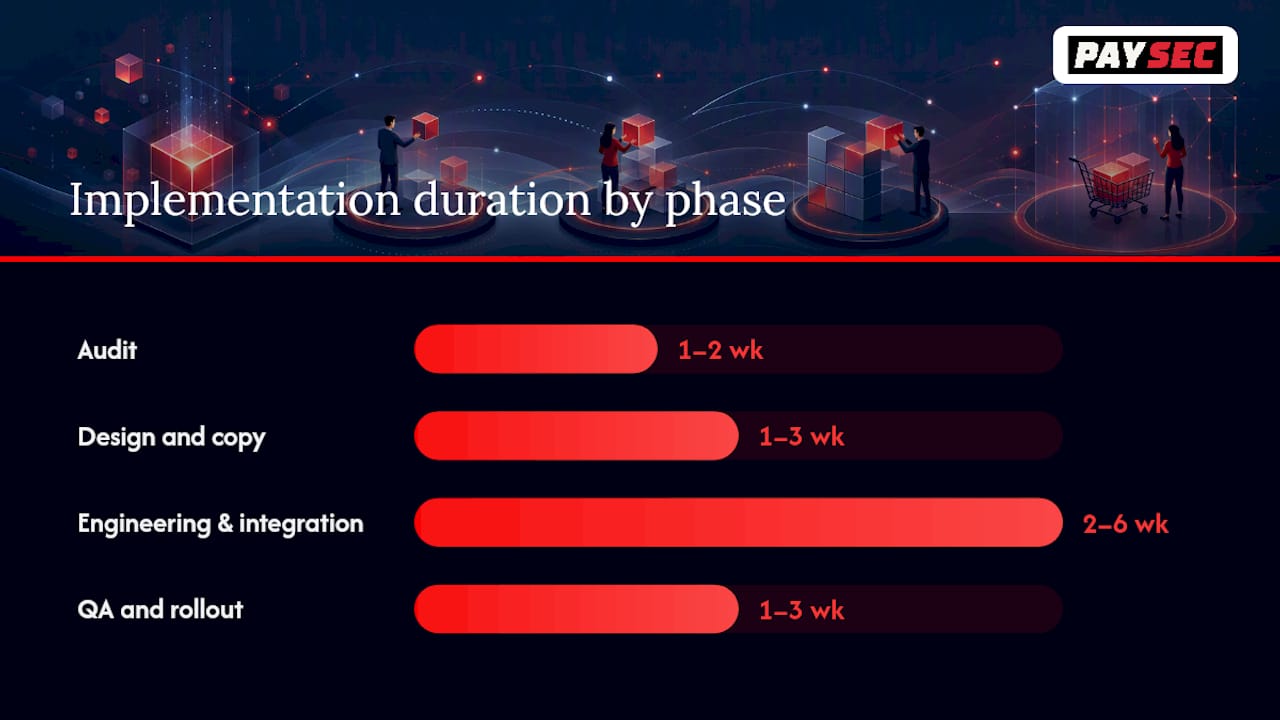
| Phase | Typical duration | Key tasks |
|---|---|---|
| Audit | 1–2 weeks | Map all fee leakage points, document current checkout flow |
| Design and copy | 1–3 weeks | Write microcopy, design sticky summary, update PDP layout |
| Engineering and integration | 2–6 weeks | Tax API integration, gateway total display, mobile QA |
| QA and rollout | 1–3 weeks | A/B test setup, staged rollout, KPI baseline capture |
Cost factors to budget for:
- Platform type. Hosted platforms (Shopify, BigCommerce) typically require less engineering time than headless or custom-built stores. Many transparency changes on hosted platforms are configuration and copy changes, not code.
- Tax engine licensing. A destination-based tax calculation API (such as Avalara or TaxJar) adds a recurring cost but is necessary for accurate early estimates in U.S. stores.
- PSP integration work. If your payment gateway does not natively display the final total on its payment form, custom integration work is required. Choosing a payment solution with the features e-commerce stores need from the start avoids this cost.
- A/B testing resource time. Plan for one to two weeks of analyst time to set up experiments, monitor results, and document findings.
Quick wins vs. longer engineering tasks:
Quick wins (days, not weeks): updating PDP copy to include a shipping estimate, adding a tax disclosure line to the cart, and relabeling the checkout CTA button with the dollar amount.
Longer tasks: integrating a real-time tax API, building a persistent sticky order summary across a custom checkout, and configuring your payment gateway to display the confirmed total on its payment form. Understanding your full e-commerce payment stack before starting engineering work saves significant rework time.
Statistic callout: Merchants who prioritize quick-win copy and UX changes first — before committing to engineering work — can capture a meaningful share of the conversion uplift within the first two weeks, then validate the business case before investing in deeper integrations.
How does your payment processor affect pricing transparency?
The payment processor a merchant chooses directly determines how much transparency is technically possible at checkout. Not all processors make it easy to display accurate, real-time totals.
Payment features that enable transparency:
- Instant quote updates. The processor's API should return a confirmed total — including any surcharge — before the customer submits payment, so the displayed amount matches the charged amount exactly.
- Clear settlement currency display. For cross-border sales, the processor should surface the settlement currency and any conversion rate before authorization.
- Interchange-plus or network-offset pricing. These models show merchants exactly what the card network charges and what the processor's margin is, rather than bundling everything into an opaque flat rate. That visibility at the merchant level makes it far easier to decide what to disclose to customers.
- Real-time reporting. Transaction-level dashboards let merchants verify that realized prices match displayed totals and catch discrepancies immediately.
- Invoiceable breakdowns. Detailed statements that separate interchange, assessments, and processor fees give merchants the data they need to make informed disclosure decisions.
Sample disclosure copy merchants can use:
- "All prices shown include applicable taxes and fees. No additional charges will be applied at payment."
- "A 2.9% credit card processing fee applies to this order. Pay by ACH to waive this fee."
- "Your total of $XX.XX is confirmed. This is the exact amount that will be charged to your card."
Paysec's network offset pricing model removes the opacity that flat-rate bundled pricing creates. Merchants see a clear breakdown of interchange costs and processor fees, which directly supports the kind of customer-facing disclosure copy shown above. Paysec's detailed transaction reporting gives merchants a real-time view of every fee component, and its no-contract, no-minimum structure means merchants can start using these features without a long-term commitment. E-commerce clients have reported a 42% reduction in processing costs after switching, which frees margin that can be reinvested in customer experience or absorbed to offer free shipping thresholds.
Pro Tip: Ask your payment processor for a sample transaction statement before signing. If you cannot identify the interchange cost, the processor margin, and any assessment fees as separate line items, you are working with a bundled pricing model that will make transparent customer-facing disclosure harder to implement accurately.
The case for starting with transparency, not waiting for it
The conventional wisdom in e-commerce is to optimize checkout for speed first and worry about fee disclosure later. That sequence is backwards. Speed matters, but trust is what converts a first-time visitor into a paying customer. A fast checkout that surprises buyers with a $12 shipping charge at the final step is slower in the only metric that matters: completed purchases.
Merchants sometimes worry that showing all fees upfront will make their prices look higher than competitors who hide costs until the end. The data does not support that concern. Buyers have learned to distrust low displayed prices because they have been burned too many times. A store that shows an honest $52.12 total on the product page often outconverts a competitor showing $39.99 with fees revealed at checkout, because the buyer's mental accounting has already priced in the hidden costs.
Premium brands face a real tension here, and the HBR research on cost transparency is worth taking seriously. Disclosing manufacturing costs for a luxury product is not the same as disclosing total checkout costs. The former invites fairness comparisons; the latter builds purchase confidence. The distinction matters. Show the all-in price clearly. Keep the cost-component breakdown behind a toggle for customers who want it.
The merchants who get the most out of transparent pricing treat it as a continuous measurement practice, not a one-time launch. They track realized price against list price, monitor chargeback rates by product line, and run regular A/B tests on checkout copy. That discipline is what separates stores that see a 15% conversion lift and sustain it from those that see a brief improvement and then plateau.
Paysec gives merchants the tools to price with full clarity
Merchants who want to implement transparent payment pricing need a processor that makes the underlying fee structure visible, not one that bundles everything into an opaque flat rate.
Paysec's network offset pricing separates interchange costs from processor fees, giving merchants a clear line-item view of every transaction. That visibility is the foundation of accurate customer-facing disclosure. Real-time dashboards surface realized totals instantly, so merchants can verify that what customers see matches what they are charged. No long-term contracts and no monthly minimums mean merchants can get started without risk. E-commerce clients have reported processing cost reductions of 30–60%, with one documented case showing a 42% reduction. See Paysec's transparent pricing model and get started today.
Sources
The following sources informed this article and are worth consulting for deeper research.
- Pricing Strategy Guide: Benefits, Types, and Strategies | Salesforce
- Price transparency in international retailing on digital platforms | International Marketing Review | Emerald Publishing
- E-commerce Price Transparency: How to Build Trust and Boost Conversion Rates with Clear Pricing Strategies - Dre Dyson
- Enhance Sales with Transparent Pricing
- Cost transparency: The net's real threat to prices and brands | Harvard Business Review
- How To Build A Product Pricing Strategy: A Step-By-Step Guide (2026)
FAQ
What is transparent payment pricing?
Transparent payment pricing means displaying every mandatory charge — product price, shipping, taxes, and any processing fees — before the customer reaches the final payment step. No costs are added after the buyer has committed.
Why is transparent pricing important for online stores?
Surprise fees at checkout are the leading cause of cart abandonment. Showing an accurate all-in total early reduces that friction, builds buyer confidence, and directly improves checkout conversion rates.
What are the measurable benefits of transparent pricing?
Practitioner case examples report conversion improvements of 15–25% after removing hidden fees, alongside lower chargeback rates and reduced pricing-related support tickets.
Can transparent pricing hurt premium brand perception?
It can, if cost components (manufacturing costs, margins) are disclosed rather than total checkout costs. HBR research recommends selective and progressive disclosure for premium lines: show the all-in total clearly, but keep the cost breakdown behind an optional toggle.
How does Paysec support transparent payment pricing?
Paysec's network offset pricing separates interchange and processor fees into clear line items, and its real-time reporting dashboards let merchants verify that realized totals match what customers see at checkout, with no long-term contracts required.