
Restaurant POS integration pushes every online, delivery, and third-party order directly into your point-of-sale system, syncing menus and inventory automatically and cutting manual entry errors. Doing it right requires mapping items and modifiers, setting up credentialed API access, and testing before go-live. Standards from the PCI SSC and P2PE device validation matter here, and payment processors like Paysec factor directly into how reconciliation and reporting play out afterward.
TL;DR:
- Most POS integrations rely on mapping, testing, and monitoring to prevent silent failures like menu drift and modifier mismatches during peak operations.
- Direct, middleware, and custom API architectures suit different restaurant sizes and control needs, with multi-location setups often requiring custom API solutions for scalability.
- Real-time inventory updates and unified order processing significantly reduce errors, improve order accuracy, and speed up fulfillment across delivery and in-house channels.
- Using PCI-approved, encrypted terminals and network segmentation cuts compliance scope, but ongoing monitoring remains essential to prevent security breaches.
- Compatible hardware, supported partners, and clear ownership of customer data are crucial considerations to ensure smooth operation and privacy compliance.
Table of Contents
- How Does Restaurant POS Integration Actually Work?
- Direct Integration, Middleware, or Custom API: Which Fits Your Restaurant?
- What Operational Benefits Does POS Integration Actually Deliver?
- How Do You Implement a POS Integration Step by Step?
- What Security and PCI Rules Apply to POS Integrations?
- Why Do POS Integrations Break, and How Do You Fix It Fast?
- What Do Payment-Aware POS Integrations Change for Restaurants?
- Which POS and Delivery Partners Should You Expect Integration Support For?
- Does POS Integration Actually Improve the Customer Experience?
- What Hardware and Software Compatibility Issues Should You Watch For?
- What Does POS Integration Cost, and How Are Pricing Models Structured?
- What Data Privacy Rules Apply Beyond PCI Compliance?
- How Have Restaurants Used POS Integration to Solve Real Problems?
- Integrate for Speed, Replace Only When Capabilities Are Truly Missing
- Get Payment-Aware Support for Your POS Integration
- Sources
- FAQ
How Does Restaurant POS Integration Actually Work?
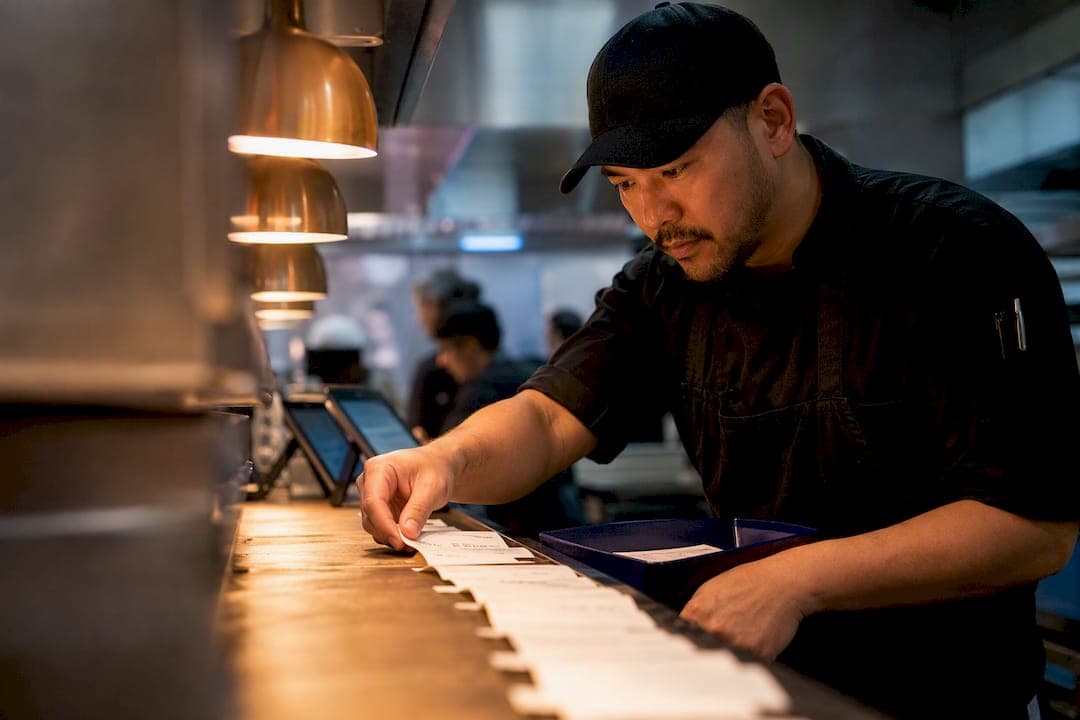
Order injection is the mechanism that makes this whole thing function. When a customer places an order through a delivery app or your online ordering page, that order gets converted into a ticket that lands in your POS exactly like a dine-in order would, complete with modifiers, special instructions, and pricing. The kitchen sees one workflow instead of five different tablets buzzing at once.
Two-way sync determines who's actually in charge of your data. In most setups, the POS acts as the single source of truth: when you 86 an item or change a price, that update pushes out to every connected channel. Some aggregator-driven models flip this, where the middleware platform holds the master menu and pushes changes down to the POS instead. DoorDash's own merchant documentation describes this order and menu data flow as the backbone of what separates a preferred integration from an ad-hoc workaround.
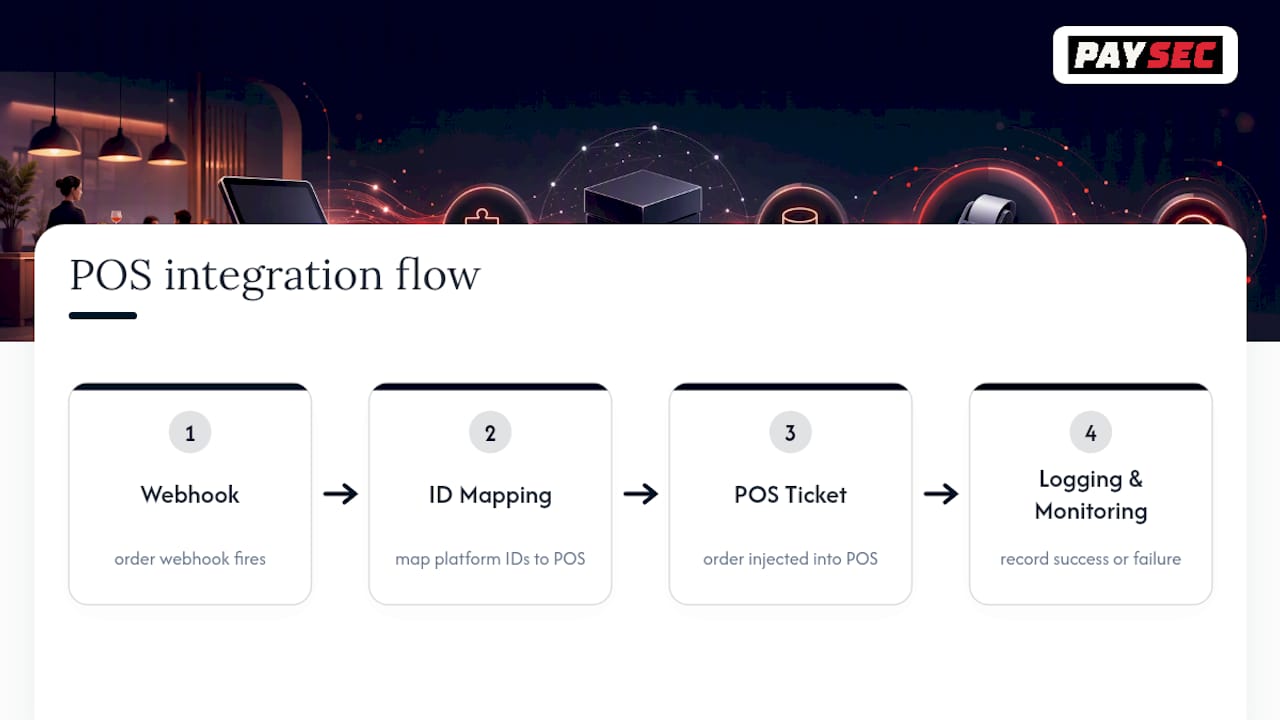
Behind the scenes, this runs on APIs and webhooks. A webhook fires when an order comes in; a mapping table translates the delivery platform's item IDs into your POS's item IDs; a logging layer tracks what succeeded and what failed. Monitoring matters more than most managers expect. Without it, a broken connection can fail silently for hours before anyone notices missing tickets.
Direct Integration, Middleware, or Custom API: Which Fits Your Restaurant?
Every restaurant POS integration falls into one of three architectures, and the right pick depends on how many locations you run and how much control you need over the details.
- Direct native integrations connect your POS vendor straight to a delivery or ordering partner with no middle layer, which usually means faster order injection and better modifier fidelity because the two systems were built to talk to each other.
- Middleware or aggregator platforms sit between your POS and multiple delivery channels, consolidating DoorDash, Uber Eats, and Grubhub orders into one feed. Deliverect's integration hub frames two-way menu sync and modifier mapping as the core value of this layer.
- Custom API integrations give you full control over data flow, built either in-house or with a developer partner, at the cost of ongoing maintenance.
Single-location restaurants often get the fastest win from a direct integration or a lightweight middleware tool. Multi-location or enterprise operators tend to need custom API work, since Oracle's restaurant POS documentation notes that open APIs and partner marketplaces are what let a central POS engine scale across dozens of locations without rebuilding the connection each time.
What Operational Benefits Does POS Integration Actually Deliver?
The math is simple: every order that skips manual re-entry is an order that can't get mistyped, duplicated, or missed. Restaurants running unified POS and online ordering report fewer canceled orders and faster fulfillment times because staff aren't toggling between four tablets to catch every ping, demonstrating key benefits highlighted in online food ordering for restaurants.
Delivery coordination improves because there's one ticketing system instead of five. A driver's arrival status, an order's "ready" state, and a kitchen's prep timeline all live in the same feed rather than getting relayed by word of mouth across a noisy kitchen.
Inventory and labor reporting benefit just as much. When online orders draw from the same inventory count as in-house orders, you get one accurate 86 list instead of two conflicting ones. BigCommerce's guidance on POS-ecommerce integration points to real-time inventory updates and unified analytics as the direct payoff of connecting these channels, and that same unified data set makes labor scheduling more accurate because you're staffing against your actual order volume, not a guess based on walk-in traffic alone.
How Do You Implement a POS Integration Step by Step?
Getting this right is a sequencing problem more than a technical one. Skip a step and you'll find out during your Friday dinner rush, which is the worst possible time to discover a mapping error.
- Audit your menu first. List every SKU, modifier, and pricing tier across all channels, and decide upfront whether your POS or your delivery platform will be the source of truth going forward.
- Prepare credentials and access. Generate API keys, set account permissions for whoever manages the integration, and confirm your network is segmented so payment systems stay isolated from general Wi-Fi traffic.
- Map and test everything. Match item IDs and modifier IDs across systems, then run test orders that hit every modifier combination your kitchen actually sees during peak hours, not just simple one-item orders.
- Go live in stages. Roll out during a low-traffic window, keep a fallback printer or tablet ready in case the connection drops, and train staff on what a failed order injection looks like before it happens live.
Pro Tip: Treat modifiers as their own data category, not an afterthought to item testing. A burger with three sauce options and two temperature settings can fail in ways a plain burger never will, so test the combinations your regulars actually order.
Monitoring doesn't stop at launch. Keep logging and alerting active for at least the first week so a dropped connection gets caught in minutes, not during a lunch rush when a manager finally notices tickets aren't printing.
What Security and PCI Rules Apply to POS Integrations?
Every POS integration that touches payment data falls under PCI DSS, and the equipment you choose determines how much of that burden lands on you. The PCI Security Standards Council maintains the PTS POI standard for terminal hardware and recommends selecting only PCI-approved devices from its published list.
Validated P2PE solutions encrypt card data right at the terminal, which meaningfully shrinks your PCI scope because the encrypted data never touches your broader network in a readable form. Pairing that with network segmentation, such as a dedicated VLAN for POS traffic separate from guest Wi-Fi, further limits how much of your infrastructure falls inside the compliance boundary, a pattern outlined in guidance on POS network segmentation and PCI scope reduction. Choosing PA-DSS validated payment applications rounds out the practical checklist.
Why Do POS Integrations Break, and How Do You Fix It Fast?
Menu drift is the most common failure: a price or item changes in one system but doesn't push to the other, and a customer orders something that no longer matches what the kitchen expects. Check your mapping table first when this happens.
Modifier mismatches show up as tickets missing a customization the customer definitely selected. Order injection failures often produce either duplicate tickets or, worse, orders that vanish entirely with no fallback alert.
- Schedule menu changes during defined change windows, never mid-shift, to avoid partial syncs.
- Push updates as atomic transactions so a menu change either fully completes or doesn't apply at all.
- Set up alerting that flags a missing order within minutes, not hours.
What Do Payment-Aware POS Integrations Change for Restaurants?
Payment routing decisions ripple straight into reconciliation. The gateway you pick determines how cleanly your transaction reports tie back to your POS batch, and mismatched systems create manual reconciliation work every single week.
Before choosing terminals or a gateway, ask how transaction data flows back into reporting and whether Network Offset Pricing is available to keep processing costs transparent. Paysec's restaurant payment processing page covers terminal options and reporting visibility built for exactly this kind of reconciliation question.
Which POS and Delivery Partners Should You Expect Integration Support For?
Most established POS platforms publish a list of supported partners rather than leaving restaurants to guess. Delivery platforms top that list, and DoorDash, Uber Eats, and Grubhub are the three every mid-size POS vendor supports in some form, whether through direct integration or a middleware layer.
Beyond delivery, look for support across a few other categories: online ordering and ecommerce platforms for your own website orders, loyalty and CRM tools so points and rewards sync without a second login, and accounting or payroll software that pulls sales data automatically instead of requiring an export every week. Oracle's Simphony integration documentation describes this as an open API and partner marketplace model, where a central POS engine connects outward to whichever partners a restaurant actually uses rather than locking operators into one closed ecosystem.
Not every POS vendor supports every partner equally well, though. Ask any vendor for their published list of active integrations before committing, and pay attention to whether that partner integration is direct or routed through a third-party middleware layer, since that affects both reliability and how quickly new features from the delivery side show up on your end. A vendor that maintains its own direct connections tends to ship fixes faster than one that depends on an aggregator's release schedule.
Does POS Integration Actually Improve the Customer Experience?
Faster service is the most immediate, visible change customers notice. When an online order lands directly in the kitchen's queue instead of getting manually keyed in by a busy server, prep starts sooner and pickup times shrink accordingly.
Loyalty programs get more useful once they're tied into a unified POS. A customer who orders through your app, your website, and in person should earn points across all three, not just one channel, and that only works when the POS is the central record for every transaction regardless of where the order originated.
Order accuracy improves too, which matters more to customer satisfaction than most operators initially assume. A manually re-typed order has more chances for a missed modifier or a wrong side dish; an order injected directly from the source has already been captured exactly as the customer entered it. Fewer wrong orders means fewer refunds, fewer angry calls, and fewer one-star reviews citing "they got my order wrong."
Wait times at pickup counters shrink as well, since staff aren't cross-checking a printed ticket against a tablet screen to confirm what a customer ordered. Some of the clearest gains actually show up around order status visibility. Customers checking an app for "your order is being prepared" updates get accurate real-time status because that status pulls directly from the POS ticket state, not from a guess by whoever answers the phone.
What Hardware and Software Compatibility Issues Should You Watch For?
Not every POS integration works with every piece of hardware you already own, and this catches operators off guard more often than the software side does. Older POS terminals, particularly ones running outdated operating systems, sometimes can't support the API calls a modern integration requires without a hardware refresh.
Printer compatibility deserves specific attention. Kitchen display systems and ticket printers need to receive injected orders in a format they can parse, and a mismatch here means orders arrive in the POS but never print in the kitchen, which is arguably worse than a delayed order because nobody notices until a customer complains.
Software ecosystem compatibility runs deeper than most managers expect. Your POS, your online ordering platform, your loyalty program, and your accounting software all need to speak a common data language, whether through shared APIs or a middleware translation layer. Cloud-based POS systems generally handle this more gracefully than older on-premise systems, since cloud platforms are built with integration in mind from the start rather than retrofitted for it.
Before signing any integration agreement, confirm your current terminal generation and operating system version against the vendor's minimum requirements. A surprising number of implementation delays come down to a restaurant discovering mid-project that its five-year-old terminal simply can't run the required software update, which turns what should be a two-week integration into a two-month hardware replacement cycle.
What Does POS Integration Cost, and How Are Pricing Models Structured?
Pricing for POS integration solutions generally falls into a few recognizable models. Some vendors charge a flat monthly fee per connected channel, meaning a restaurant with three delivery partners pays a fixed rate per partner regardless of order volume. Others charge based on transaction volume, which scales with your business but can get expensive fast during high-growth periods.
Middleware platforms that consolidate multiple delivery channels into one feed typically charge their own subscription on top of whatever the POS vendor charges, so it's worth calculating the combined cost rather than evaluating each fee in isolation. Custom API integrations carry upfront development costs, whether that's an in-house developer's time or a contracted integration partner, plus ongoing maintenance whenever a connected platform changes its API.
Payment processing costs sit alongside integration fees as a separate but related line item. Traditional processors often bundle unpredictable markups into flat-rate pricing, which makes it hard to see exactly what you're paying for each transaction. Paysec's Network Offset Pricing model passes through true wholesale interchange rates instead, which the company reports typically saves merchants 30 to 60% compared to major processors, a distinction worth understanding before signing any long-term integration or processing agreement.
What Data Privacy Rules Apply Beyond PCI Compliance?
PCI compliance covers payment card data specifically, but restaurant POS systems also collect a wider range of customer information that falls under separate privacy obligations. Names, phone numbers, email addresses, and order histories collected through loyalty programs or online ordering accounts count as personal data under state privacy laws in a growing number of jurisdictions.
Restaurants operating in states with consumer privacy statutes need to understand what data their POS integration collects, how long it's retained, and whether customers have a right to request deletion. This matters more for integrated systems than standalone ones, since data now flows between your POS, your online ordering platform, and often a third-party delivery partner, multiplying the number of places where customer information sits.
Vendor contracts should spell out who owns customer data collected through an integration and what happens to it if you switch platforms. A delivery partner that collects a customer's phone number and order history technically holds that data separately from your POS, and untangling data ownership after the fact is far harder than establishing it clearly in the initial agreement.
How Have Restaurants Used POS Integration to Solve Real Problems?
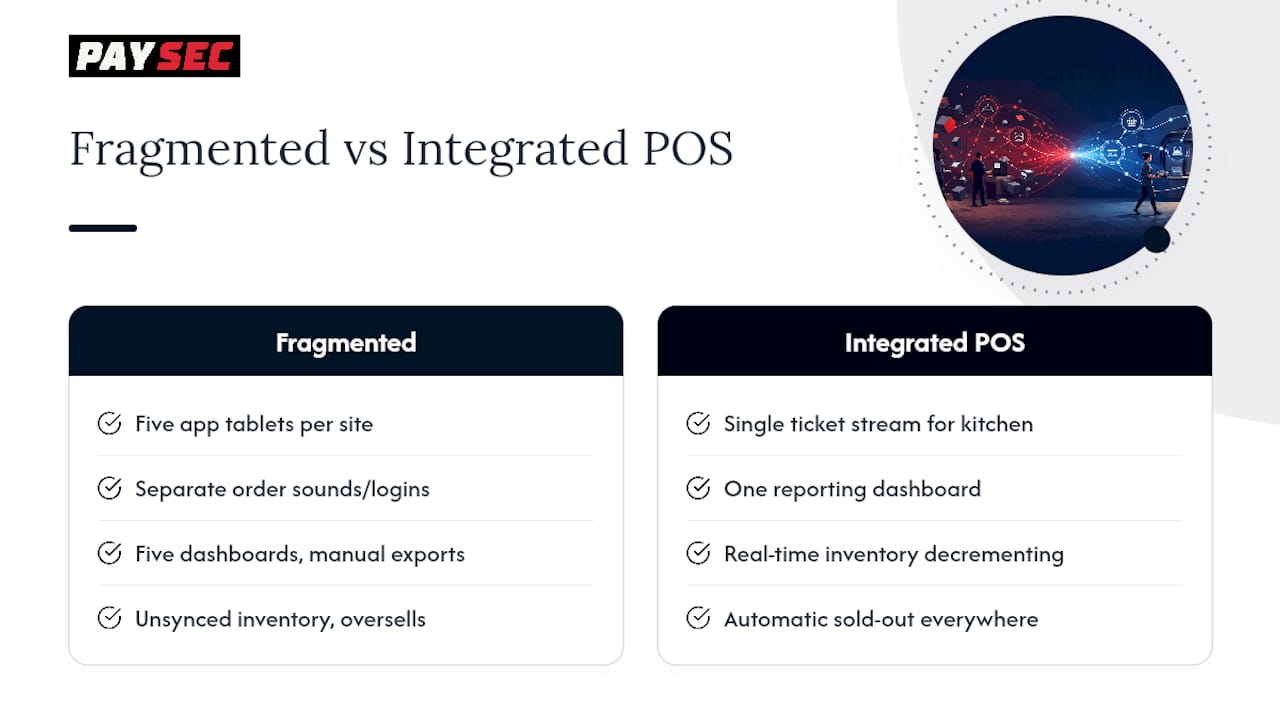
Consider a multi-location fast-casual operation juggling five separate tablets for five different delivery apps, each with its own order sound and its own login. That's the most common starting point for restaurants considering integration, and it's also the most common failure point for lost orders, since a busy line cook simply can't monitor five screens during a rush.
Switching to a consolidated integration where every channel injects directly into one POS eliminates that tablet farm entirely. Kitchen staff work off one ticket stream regardless of where the order originated, and managers get one reporting dashboard instead of five disconnected ones that each require separate login credentials and manual data exports at month's end.
The inventory side tells a similar story. A restaurant selling the same limited-quantity special through its dining room and three delivery apps simultaneously risks overselling that item if inventory counts aren't synced in real time. Integrated systems solve this by decrementing available inventory the moment any channel sells the last portion, automatically marking it unavailable everywhere else instead of leaving delivery apps showing an item the kitchen already ran out of an hour earlier.
Multi-location groups get an added benefit from centralized reporting once every location runs the same integrated setup. Comparing sales, labor costs, and order accuracy across ten locations becomes a single dashboard exercise instead of ten separate exports stitched together manually by a regional manager every week.
Integrate for Speed, Replace Only When Capabilities Are Truly Missing
Integration is almost always the faster, cheaper path to unify orders and reporting across channels. Full POS replacement only makes sense when core capabilities, like real-time inventory or modifier support, are missing across every single location you run.
— PaySec Marketing Team
Get Payment-Aware Support for Your POS Integration
A POS integration is only as strong as the payment infrastructure behind it, and that's where Paysec fits into the picture for restaurants running online ordering, delivery, and in-house sales through one system. Paysec's Network Offset Pricing passes through true wholesale interchange rates instead of flat-rate markups, which the company reports typically saves merchants a significant percentage compared to major processors, without long-term contracts locking you in.
Paysec's merchant services cover in-store processing, an eCommerce gateway, and mobile payments, all built to work alongside the POS integration you're already running or planning to build. Detailed transaction reporting keeps reconciliation clean once orders start flowing in from multiple channels, and terminal options through Paysec's smart terminal offerings give you hardware built for exactly this kind of integrated setup. If your restaurant is evaluating processing costs alongside a new integration project, review Paysec's pricing options and request a consultation to see what Network Offset Pricing looks like for your transaction volume.
Sources
- POS Integration Overview | DoorDash for Merchants
- PIN Transaction Security (PTS) Point of Interaction (POI) standard
- Deliverect integrations hub
- POS Integrations for Restaurants - Oracle
FAQ
What Is Restaurant POS Integration?
Restaurant POS integration connects your point-of-sale system to online ordering, delivery platforms, and other software so orders, menus, and inventory sync automatically instead of requiring manual entry across multiple devices.
How Long Does It Take to Set Up a POS Integration?
Timelines vary by architecture, but most direct integrations can be mapped, tested, and launched within one to three weeks when the menu audit and credential setup happen before testing begins.
Does POS Integration Reduce PCI Compliance Burden?
Yes, when paired with validated P2PE terminals and network segmentation, which encrypt card data at the point of capture and shrink how much of your network falls inside PCI scope, as outlined by the PCI Security Standards Council.
What Causes Most POS Integration Failures?
Menu drift and modifier mismatches cause the majority of integration issues, usually from menu updates made in one system without pushing to the other, or from incomplete modifier mapping during setup.
Does Paysec Support POS Payment Integration for Restaurants?
Yes, Paysec offers payment gateway, terminal, and reporting tools designed to work alongside restaurant POS integrations, with Network Offset Pricing available on request through Paysec's pricing page.