

TL;DR:
- Setting up an ecommerce merchant account involves preparing extensive documentation to demonstrate business legitimacy, stability, and compliance, which influences long-term operations. Choosing the right provider based on pricing, integration, and support, along with configuring fraud controls and PCI compliance, reduces risks and costs. Thorough testing and architectural decisions during setup are crucial for maintaining favorable transaction rates, minimizing chargebacks, and ensuring ongoing compliance.
Ecommerce merchant account setup is the process of establishing a specialized payment processing account that allows your online store to accept credit and debit card transactions securely and cost-effectively. Unlike a standard business bank account, a merchant account acts as a holding account between your customer's card issuer and your business bank account. Platforms like Shopify Payments and processors like Stripe have made the process more accessible, but the underlying requirements around documentation, compliance, and integration still trip up many store owners. Getting the setup right from day one determines your transaction fees, your chargeback exposure, and whether your account stays open long-term.
What documents do you need for an ecommerce merchant account setup?
The application process for a merchant account for ecommerce is more document-intensive than most business owners expect. Providers are not just opening a bank account. They are underwriting your business as a financial risk, which means they need proof that your business is legitimate, financially stable, and operating within card network rules.

Business registration details, EIN, financials, and bank info are mandatory for merchant account applications, along with evidence of a live ecommerce site with published policies. That last requirement catches many applicants off guard. Your website must be live and include a refund policy, privacy policy, and shipping policy before you submit your application.
Here is a breakdown of what most providers require:
| Document | Purpose |
|---|---|
| Business registration certificate | Confirms legal entity status |
| Employer Identification Number (EIN) | Tax identification for underwriting |
| Recent bank statements (3 months) | Demonstrates financial stability |
| Tax returns or financial statements | Verifies revenue history |
| Government-issued owner ID | Identity verification for principals |
| Voided check or bank letter | Routes settlement deposits correctly |
| Live website URL with published policies | Confirms compliant ecommerce operation |
Consistency matters more than most applicants realize. The name on your bank account, your business registration, and your website must all match. Inconsistencies in entity identity are one of the most common reasons underwriting reviews get delayed. If your legal business name is "Acme Retail LLC" but your website says "Acme Store," fix it before you apply.
Pro Tip: Organize all documents into a single folder before starting your application. Providers that receive complete submissions process them significantly faster than those that require follow-up requests.
How to choose the best merchant account provider for your ecommerce business
Choosing among the best ecommerce merchant providers is not just a fee comparison exercise. The right provider depends on your business model, your product category, your expected transaction volume, and your technical setup.
Start with pricing structure. Most providers offer one of three models: flat-rate pricing (a fixed percentage per transaction, common with Stripe and Square), interchange-plus pricing (wholesale card network rates plus a fixed markup), or tiered pricing (bundled rate categories that often obscure true costs). For most ecommerce businesses processing more than $10,000 per month, interchange-plus pricing delivers lower effective rates. Understanding the full ecommerce payment processing fees structure before signing is non-negotiable.
Key factors to evaluate when comparing providers:
- Transaction fees: Compare effective rates across your actual card mix, not just the advertised rate
- Platform integration: Confirm native compatibility with your ecommerce platform, whether that is Shopify, WooCommerce, Magento, or Adobe Commerce
- Contract terms: Month-to-month agreements protect you; multi-year contracts with early termination fees do not
- Chargeback support: Providers with built-in dispute management tools reduce your operational burden
- Industry fit: High-risk categories like CBD, supplements, or digital goods require specialized providers with appropriate underwriting
- Customer support: 24/7 phone support matters when a payment issue surfaces on a Saturday night
Pro Tip: Request a sample merchant statement from any provider before signing. A real statement reveals the true effective rate, including all fees that never appear in the advertised rate.
The provider you choose also affects your PCI DSS compliance scope, your integration options, and your ability to switch ecommerce payment processors later without rebuilding your checkout. Think beyond the rate card.
What is the step-by-step application and approval process?
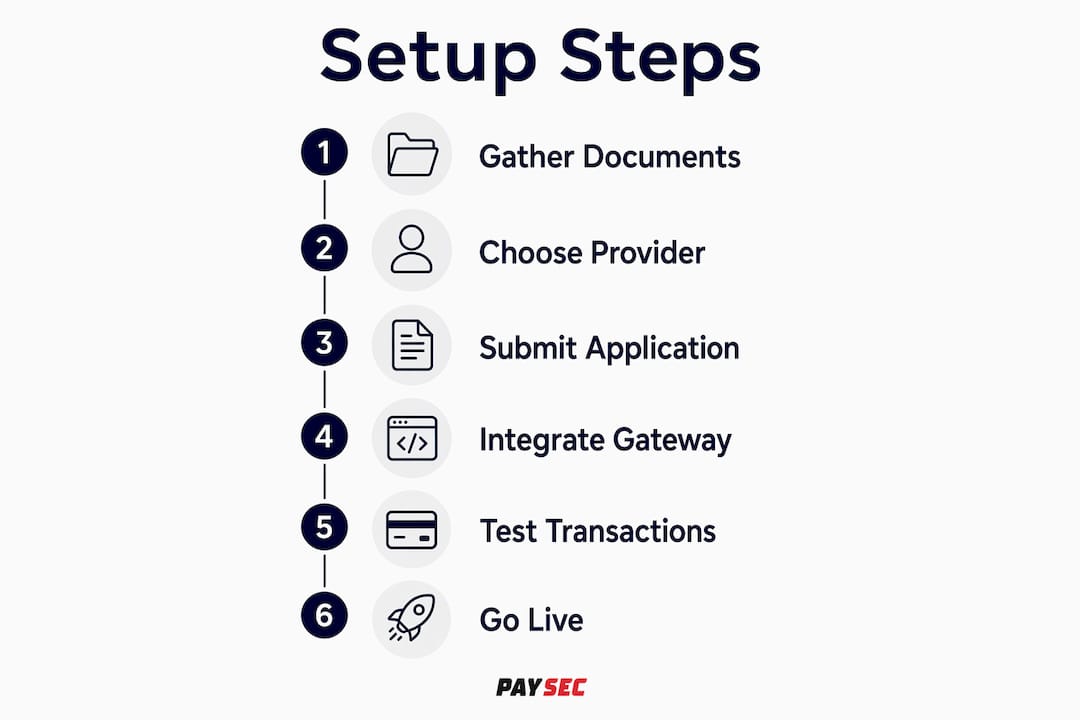
The application process for a merchant account follows a predictable sequence, but the timeline varies significantly based on your risk profile. Understanding each stage helps you move through it without unnecessary delays.
- Complete the merchant application form. Provide full legal business name, ownership structure, business address, website URL, and estimated monthly processing volume. Accuracy here is critical. Mismatches between your application and your supporting documents trigger manual review.
- Submit all supporting documentation. Upload your EIN confirmation, bank statements, government ID, voided check, and website URL. Include your published refund, privacy, and shipping policies.
- Underwriting review begins. The provider assesses your business age, credit profile, chargeback history, and the nature of your products. Approval depends on business age, credit, and chargeback history, with clear refund and return policies accelerating the process.
- Respond to additional information requests promptly. Underwriters frequently request clarification on product descriptions, processing history, or ownership details. Delays in responding extend your timeline by days or weeks.
- Receive approval and review your merchant agreement. Read the terms carefully, paying attention to reserve requirements, chargeback thresholds, and termination clauses before signing.
- Configure your payment gateway. Connect your approved merchant account to a payment gateway like Authorize.Net, NMI, or your provider's native gateway. This is where your online payment setup becomes functional.
- Integrate with your ecommerce checkout. Connect the gateway to your store's checkout flow and configure settlement mapping to your business bank account.
- Test before going live. Run test transactions, simulate refunds, and verify that settlement reports map correctly to your bank account.
Approval timelines vary by risk profile: low-risk businesses typically see decisions in one to three days, newer businesses in three to seven days, and high-risk merchants in one to three weeks. Plan your launch timeline accordingly.
The most common mistake at this stage is treating the merchant account and the payment gateway as the same thing. They are separate systems. Your merchant account holds funds; your gateway authorizes transactions. Both must be configured and connected before your store can process a single payment.
How to manage risk, reduce chargebacks, and stay PCI DSS compliant
Risk management is not a post-launch concern. The fraud controls and compliance decisions you make during setup directly affect your transaction fees, your reserve requirements, and whether your account remains in good standing.
Understanding chargeback thresholds
Chargeback rates above 1% risk account termination and higher fees. That threshold sounds generous until you realize that a single disputed transaction on a low-volume account can push you over it. Visa and Mastercard both operate formal chargeback monitoring programs, and processors enforce their own thresholds that are often stricter than the card networks' rules.
Chargebacks affect underwriting and reserve requirements, which means a high dispute rate in your first 90 days can trigger a rolling reserve. A rolling reserve holds a percentage of your daily settlements for 90 to 180 days as a financial buffer for the processor. That is real working capital locked away from your business.
Fraud prevention settings to configure at setup
Configuring fraud controls like AVS and CVV settings during setup reduces chargebacks and improves your risk profile with the processor. Address Verification Service (AVS) checks that the billing address provided matches the card issuer's records. CVV verification confirms the cardholder has the physical card. Both are standard settings in most gateway control panels and should be enabled from day one.
Additional fraud controls worth configuring at setup:
- Velocity filters that flag multiple transactions from the same IP address
- Maximum transaction amount limits appropriate to your average order value
- Block lists for known fraudulent email addresses or shipping addresses
- 3D Secure 2.0 authentication for high-value transactions, which shifts liability to the card issuer on approved transactions
PCI DSS compliance in 2026
PCI DSS 4.0.1 has been mandatory since March 31, 2025, and ecommerce merchants must comply based on their integration scope. The compliance level you fall under depends on how your checkout handles cardholder data.
Using fully hosted payment pages reduces PCI scope to SAQ A. Embedded iframes or hosted fields require higher compliance effort under SAQ A-EP. The practical difference is significant. SAQ A involves roughly 22 requirements. SAQ A-EP involves over 190. Choosing a redirect-based or fully hosted checkout is not just a UX decision. It is a compliance strategy.
PCI DSS compliance burden can be greatly reduced by choosing payment integration methods that minimize cardholder data exposure. The architecture decision you make at setup determines your compliance workload for years. For a deeper look at what compliance requires for smaller operations, the PCI compliance guide for small businesses from Paysec covers the practical requirements without the technical jargon.
What technical integrations and testing are required before going live?
Treat merchant account setup as integrated configuration across your merchant account, payment gateway, checkout flow, and reporting systems. Treating these as separate tasks is how merchants end up with payment holds, settlement mismatches, and reporting gaps after launch.
The three primary integration architectures for ecommerce payment processing each carry different tradeoffs:
| Integration method | How it works | PCI DSS scope |
|---|---|---|
| Redirect (hosted page) | Customer leaves your site to pay on provider's page | SAQ A (lowest burden) |
| iFrame / hosted fields | Payment form embedded on your site via provider's code | SAQ A-EP (moderate burden) |
| Direct API integration | Card data submitted directly through your server | SAQ D or full PCI audit (highest burden) |
For most ecommerce merchants, the redirect or hosted fields approach delivers the right balance of customer experience and compliance simplicity. Direct API integration is reserved for businesses with dedicated security infrastructure and compliance resources.
Pro Tip: Run at least 10 test transactions before going live, including a full refund cycle and a declined card scenario. Verify that each transaction appears correctly in both your gateway reporting and your bank settlement reports. Mismatches here cause holds that can freeze your account.
Testing the entire payment flow including refunds and integration mapping avoids reserves and payment holds post-approval. Most processors provide a sandbox environment for exactly this purpose. Use it thoroughly. A payment hold on your first week of live transactions is a poor way to discover a configuration error.
For merchants using Adobe Commerce or Magento, the PaySec and Adobe Commerce integration demonstrates how zero-fee processing connects directly to platform-level checkout without custom development. The ecommerce payment stack explained is worth reviewing before finalizing your architecture decisions.
Key takeaways
A successful ecommerce merchant account setup requires complete documentation, a provider matched to your risk profile, PCI-compliant integration architecture, and thorough testing before your first live transaction.
| Point | Details |
|---|---|
| Documentation completeness | Submit all required documents in one pass to avoid underwriting delays and extended review timelines. |
| Provider selection criteria | Evaluate contract terms, integration compatibility, and chargeback support, not just the advertised transaction rate. |
| Chargeback management | Configure AVS, CVV, and velocity filters at setup to stay below the 1% threshold that triggers reserves or termination. |
| PCI DSS architecture choice | Select a hosted or redirect checkout to limit compliance scope to SAQ A and reduce your ongoing compliance workload. |
| Pre-launch testing | Test full transaction cycles including refunds and settlement mapping before accepting live payments. |
The setup decisions that actually determine your long-term costs
Most ecommerce merchants focus on the advertised transaction rate when setting up a merchant account. That focus is understandable and almost entirely misplaced. The rate is the starting point. What determines your actual cost of payment acceptance is the combination of your chargeback rate, your PCI compliance posture, your integration architecture, and the reserve requirements your provider imposes based on their underwriting assessment of your business.
At Paysec, we see this pattern repeatedly. A merchant signs with a provider offering a competitive flat rate, skips the fraud configuration step, and then spends the next six months managing disputes, absorbing reserve holds, and paying elevated fees because their risk profile deteriorated in the first 90 days. The rate they were quoted is irrelevant at that point.
The merchants who get this right treat the setup process as a risk management exercise, not an administrative task. They get their documentation in order before applying. They choose an integration architecture based on their compliance capacity, not just what their developer finds easiest to build. They configure fraud controls on day one, not after the first dispute arrives. They test every edge case in the sandbox before going live.
There is also a tendency to underestimate how much the provider relationship matters beyond the rate. A provider with strong dispute management tools, transparent reporting, and no long-term contract gives you leverage. You can negotiate, you can leave, and you can hold them accountable for service quality. A provider that locks you into a three-year contract with a $500 early termination fee removes all of that leverage on day one.
The other thing worth saying directly: PCI DSS 4.0.1 is not optional, and the merchants treating it as a checkbox exercise are accumulating liability. The architecture decision you make at setup, specifically whether you use a fully hosted payment page or embed card fields directly on your site, determines your compliance burden for years. Making that decision thoughtfully at setup costs nothing. Retrofitting your checkout architecture 18 months later costs a great deal.
— PaySec Marketing Team
How Paysec helps ecommerce merchants reduce processing costs from day one
Setting up a merchant account is the beginning of your payment processing relationship, not the end. The provider you choose determines your fees, your compliance support, and your ability to scale without cost surprises.
Paysec's dedicated merchant services are built specifically for businesses that want transparent pricing and measurable cost reduction. Through Network Offset Pricing, Paysec clients across ecommerce, SaaS, healthcare, and retail consistently achieve 30 to 60% reductions in processing costs, with no hidden fees, no minimums, and no long-term contracts. One client reduced processing costs by 42% in the first billing cycle. If you are ready to see what that looks like for your store, explore Paysec's pricing or visit paysec.ai to get started.
FAQ
What is an ecommerce merchant account?
An ecommerce merchant account is a specialized bank account that holds funds from card transactions before they settle to your business bank account. It is a required component of any online payment setup that accepts credit or debit cards.
How long does merchant account approval take?
Approval timelines range from one to three days for low-risk businesses to one to three weeks for high-risk or newly established merchants. Submitting complete documentation in your initial application is the single most effective way to accelerate approval.
What documents are required to apply?
Most providers require your EIN, business registration, three months of bank statements, government-issued owner ID, a voided check, and a live website with published refund, privacy, and shipping policies.
What chargeback rate puts my account at risk?
A chargeback rate above 1% triggers processor warnings, elevated fees, or account termination. Configuring AVS and CVV verification at setup is the most direct way to keep your dispute rate below that threshold from the start.
What PCI DSS compliance level applies to ecommerce merchants?
Most ecommerce merchants fall under SAQ A if they use a fully hosted payment page, or SAQ A-EP if they use embedded iframes or hosted fields. PCI DSS 4.0.1 has been mandatory since March 31, 2025, and the compliance level you qualify for depends entirely on your integration architecture.