

Level 3 processing lowers interchange rates on qualifying commercial and government card transactions by submitting detailed line-item data with each sale. It works because issuers reward the reduced risk and stronger audit trail that come with itemized purchase data. The savings compound fastest on high-ticket, recurring B2B and government-to-business payments, but only if your systems capture and validate the required fields correctly.
TL;DR:
- Level 3 processing offers the greatest savings for high-value, recurring B2B and government transactions that accurately capture and validate detailed line-item data.
- Qualification depends on the card type, with business, purchasing, fleet, and government cards most likely to support Level 3, while consumer cards rarely qualify.
- Exact requirements include transaction-level fields like purchase order number and tax amount, plus line-item details such as item description, quantity, and product code, which must be properly formatted.
- Most failures stem from missing or malformed fields or ineligible consumer cards, with issuer acceptance ultimately determining qualification success.
- Automated tools like PaySec simplify Level 3 implementation, enabling quick rollout and significant cost reductions, especially for large transactions and government procurement.
Table of Contents
- What Is Level 3 Processing and How It Differs From Level 1 and Level 2
- Benefits and Typical Savings for B2B and Government Transactions
- Exact Level 3 Data Fields Required: A Practical Checklist
- Which Cards Qualify for Level 3 Processing
- How to Implement Level 3 Processing Step by Step
- Why Level 3 Submissions Fail or Get Downgraded
- PaySec Case Evidence and KPIs to Track
- Where to Start Your Level 3 Optimization Rollout
- How PaySec Automates Level 3 Optimization
- Sources
- FAQ
What Is Level 3 Processing and How It Differs From Level 1 and Level 2
Payment networks classify transactions into three data tiers, and each tier unlocks a different interchange rate. Level 1 is the baseline: card number, expiration date, and total amount. That's what a consumer swipe at a retail counter typically sends.
Level 2 adds a layer of commercial context: tax amount, customer code, and merchant zip code. It's common on corporate card transactions but still lacks the granular detail purchasing departments need for reconciliation.
Level 3 goes further, requiring true line-item data, the kind found on an itemized invoice. Issuers offer lower interchange at this tier because the extra data reduces fraud risk and gives procurement systems what they need to auto-match purchase orders against actual charges.
Network support varies:
- Visa and Mastercard both support full Level 2 and Level 3 processing on eligible commercial cards.
- American Express and Discover have narrower Level 3 support and different field requirements, so confirm eligibility with your processor before building integrations.
- Level 3 data processing applies almost exclusively to business, purchasing, and government card products, not standard consumer cards.
The Visa developer documentation on Level III processing lists the required and optional fields directly, and recommends checking with your acquirer since field requirements shift over time.
Benefits and Typical Savings for B2B and Government Transactions
The financial case for advanced transaction processing at Level 3 gets stronger as ticket size grows. Industry data points to typical savings of 50 to 150 basis points per qualifying transaction, depending on card type and how the merchant category is classified. On a large government contract payment, even a modest percentage of savings can represent significant monthly cost reductions.
Pro Tip: Run the math on your average B2B ticket size before assuming Level 3 is worth the integration effort. A $200 average sale rarely justifies the engineering time; a $5,000 average sale almost always does.
Beyond the rate reduction, merchants gain:
- Cleaner reconciliation between purchase orders and settled transactions, since line-item data mirrors what procurement systems already track.
- Fewer disputes, because itemized data gives both parties a shared record of exactly what was purchased.
- Faster month-end closes for finance teams that no longer have to manually match invoices to card statements.
Wholesale distribution, government contracting, industrial supply, and large professional services firms tend to see the biggest impact, largely because their transactions are already invoice-driven and high-value. Interchange optimization strategies built around Level 3 data tend to deliver the fastest payback in exactly these verticals.
Exact Level 3 Data Fields Required: A Practical Checklist
Level 3 payment details fall into two buckets: transaction-level fields and line-item fields. Miss one required field, and the transaction typically downgrades to Level 2 pricing instead of being rejected outright, but you lose the savings either way.
Transaction-level fields:
- Invoice or purchase order number
- Total tax amount (and tax rate, for some networks)
- Freight or shipping amount
- Duty amount, if applicable
- Ship-from and ship-to postal codes
Line-item fields (repeated per item on the invoice):
- Item description
- Quantity
- Unit of measure
- Unit price
- Product or commodity code (typically a UNSPSC or similar classification)
QuickBooks' guide to Level 3 data processing walks through how these fields map to a typical commercial invoice. Formatting matters as much as completeness. The PayPal developer documentation notes that field names and formats have to match exactly between order data and supplementary data objects, and a mismatch can cause the extra data to be silently dropped rather than flagged as an error.
Which Cards Qualify for Level 3 Processing
Not every business card qualifies, and knowing that early avoids wasted development effort. Corporate cards, purchasing cards, fleet cards, and government-issued procurement cards are the categories most likely to be eligible for level 3 credit card processing.
Qualification isn't guesswork. Gateways run a BIN (bank identification number) lookup against the first six to eight digits of the card number before attempting a Level 3 submission, which tells the system instantly whether the card belongs to a commercial or government program.
- Consumer debit and credit cards almost never qualify, regardless of how complete your payload is.
- Visa and Mastercard commercial cards have the broadest Level 3 eligibility across issuers.
- American Express and Discover apply their own qualification logic, so confirm support with your processor rather than assuming parity across networks.
How to Implement Level 3 Processing Step by Step
Getting level 3 processing requirements right the first time saves months of troubleshooting. The path looks different depending on whether you're integrating an API, using a virtual terminal, or running recurring billing, but the core steps stay consistent.
- Choose your integration path. API mapping suits custom software and ERP-connected checkouts; virtual terminals work for manually keyed B2B invoices; e-invoicing platforms and recurring billing tools need their own field mapping for repeat transactions.
- Set merchant-level defaults once. Your merchant postal code and default commodity codes rarely change transaction to transaction, so configure them once at the gateway level instead of resending them with every call.
- Automate BIN qualification. Run the BIN check before attempting Level 3 data, so ineligible consumer cards route straight to standard processing without wasted payload.
- Validate the payload before submission. Check that every required field is present and correctly formatted, catching errors before they reach the network rather than after a downgrade.
- Build a fallback to Level 2. If Level 3 data is incomplete for any reason, submitting to Level 2 still beats losing the transaction or defaulting to standard rates.
- Monitor your qualification rate monthly. Track what percentage of eligible transactions are actually clearing at Level 3, not just whether the integration is technically live.
Fluid Pay's documentation on Level 3 credit card processing covers this auto-population and fallback approach in more technical detail, and it's a useful reference for engineering teams scoping the build.
Why Level 3 Submissions Fail or Get Downgraded
Most Level 3 failures trace back to a handful of predictable causes, and nearly all of them are fixable before they happen.
- Missing or malformed required fields are the single biggest cause of disqualification. A blank commodity code or an incorrectly formatted tax amount is enough to trigger a downgrade to Level 2.
- Attempting Level 3 on an ineligible consumer card wastes processing overhead without any chance of a lower rate, since consumer cards don't carry the commercial designation networks require.
- Issuer-level acceptance is the final gate. Even a perfectly formatted, fully compliant payload can still be declined at the issuer's discretion, since the issuing bank ultimately determines qualification, not just the network's technical rules.
Building a validation step before submission, and logging which fields fail most often, turns this from a mystery into a fixable maintenance task.
PaySec Case Evidence and KPIs to Track
Real client results make the case for Level 3 optimization more concrete than any interchange table. A wholesale distributor working with PaySec cut processing costs by 44% after implementing Level III data optimization, and a CPA firm reduced processing fees by 38% through broader interchange optimization work.
PaySec's platform handles the mechanics that typically cause failures elsewhere: auto-population of merchant defaults, automated BIN qualification checks, and real-time reporting for downgrades.
Track these KPIs once you're live:
- Percentage of qualified volume hitting Level 3 versus falling back to Level 2 or standard rates
- Basis-point savings per transaction against your prior blended rate
- Monthly dollar savings, tracked against processing volume to confirm the trend holds as volume scales
Where to Start Your Level 3 Optimization Rollout
Start with your highest-ticket B2B flows first, since that's where basis-point savings translate into the largest dollar impact fastest. Automate BIN qualification and merchant defaults before writing a single line of custom code. Run a short pilot, measure your qualified rate, and only then scale to the rest of your transaction volume.
— PaySec Marketing Team
How PaySec Automates Level 3 Optimization
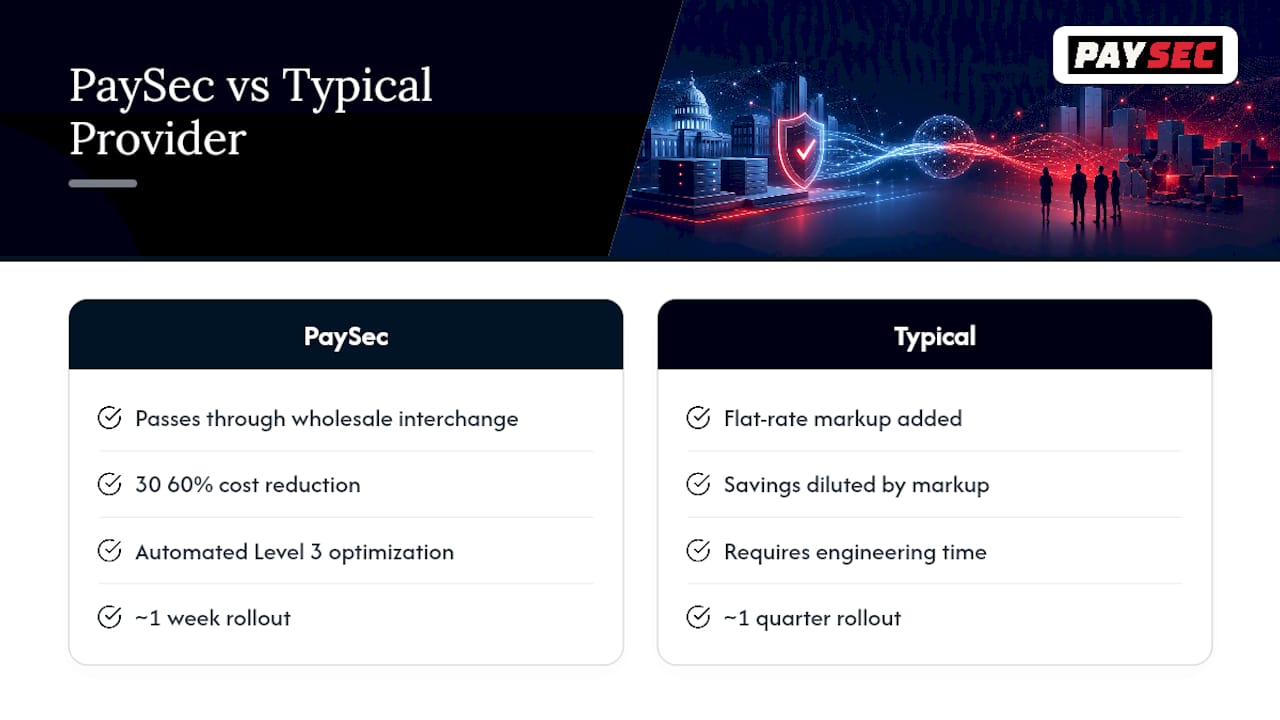
PaySec's Network Offset Pricing passes through true wholesale interchange rates, which means the savings from qualifying at Level 3 aren't diluted by a flat-rate markup layered on top. That combination, transparent pricing plus automated Level 3 data optimization, is what typically drives the 30 to 60% cost reductions PaySec clients report.
Under the hood, PaySec handles the parts of level 2 and 3 processing that usually require engineering time: automated BIN qualification checks, auto-population of static merchant fields, and real-time reconciliation reporting that flags downgrades before they cost you money. For B2B and government merchants processing high-ticket transactions, that means the difference between a Level 3 rollout that takes a quarter and one that takes a week.
Merchants exploring what this looks like for their own transaction volume can review PaySec's merchant services or check current pricing plans directly. There are no long-term contracts and no monthly minimums, so requesting a savings estimate carries no commitment either way.
Sources
For exact field names and formats, consult Visa's developer documentation and PayPal's Level 2/3 guide directly.
- QuickBooks: Learn about Level 3 data processing
FAQ
What Is the Difference Between Level 2 and Level 3 Processing?
Level 2 adds commercial data like tax amount and customer code to a transaction, while Level 3 adds full line-item detail, including item descriptions, quantities, and commodity codes. Level 3 typically earns a lower interchange rate than Level 2 because it gives issuers a more complete picture of the purchase.
What Is L2 and L3 Data Exactly?
L2 (Level 2) data includes tax amount, merchant zip code, and customer code attached to a commercial card transaction. L3 (Level 3) data adds itemized purchase details like unit price, quantity, and product codes, which PayPal's documentation lists in full for merchants building integrations.
Are Third-Party Payment Processors High Risk?
Processor risk depends on the merchant's industry and transaction profile, not on using a third-party processor itself. Merchants across multiple industries, including sectors like CBD retail that traditional banks often decline, are supported, while maintaining PCI DSS Level 1 compliance.
What Are the Best Processors for Level 3 Support?
The strongest options combine broad network support for Level 2 and Level 3 with automated field population, so merchants aren't manually entering line-item data for every transaction. PaySec's platform includes automated BIN qualification and Level 3 data optimization built into its merchant services, with current plan details available on its pricing page.
Why Would a Correctly Formatted Level 3 Transaction Still Get Declined?
Network and gateway validation only confirm that a payload is properly formatted, not that the issuing bank will approve it. The issuing bank makes the final qualification decision, so a technically perfect submission can still be declined at the issuer's discretion.