

Interchange optimization is the process of structuring transaction data, routing, and settlement timing so card-network rules qualify each sale for the lowest possible interchange tier. For merchants processing B2B, wholesale, or large-ticket transactions, that translates into real, measurable savings, not merely a theoretical discount.
The typical benefit runs 0.30% to 0.50% per eligible B2B transaction when Level III data qualifies correctly, with industry estimates putting the broader Level II/III savings range at 40 to 100 basis points on eligible commercial volume. On a portfolio processing a significant amount in B2B card volume, that range can mean meaningful annual savings from fees currently paid at unnecessarily high interchange categories.
Here's what to do first:
- Start capturing enhanced data now. Tax amount, purchase order or customer code, and line-item detail (description, quantity, unit cost) are the fields that unlock Level II and Level III pricing.
- Fix your batch timing. Settling within network windows, ideally within 24 hours, prevents automatic downgrades that erase whatever savings your enhanced data just earned.
Get those two things right and the rest of this guide shows you how to build the discipline around them.
Key Takeaways
Interchange optimization lowers B2B card processing costs by qualifying transactions for Level II or Level III rates through complete data, correct formatting, and disciplined batch timing.
| Point | Details |
|---|---|
| Capture enhanced data | Collect tax amount, PO/customer code, and line-item detail at the point of sale, not after. |
| Fix batch timing | Settle within network windows, ideally 24 hours, to avoid automatic downgrades. |
| Choose transparent pricing | Interchange-plus or network offset pricing ensures savings reach your statement, not the processor's margin. |
| Monitor continuously | Run monthly reconciliation between billed and expected interchange rates to catch drift early. |
| Consider a turnkey partner | Paysec's Network Offset Pricing combines automated Level II/III capture with real-time reporting for measurable, ongoing savings. |
Run a pilot on your highest-ticket B2B invoices first. It's the fastest way to validate real savings before committing to a full rollout.
Table of Contents
- What Is Interchange Optimization?
- How Does Interchange Data Actually Move Through a Transaction?
- What Data Fields Qualify a Transaction for Level II or Level III?
- Who Actually Sets Interchange Rates?
- Which Industries Get the Most Value From Optimizing Interchange?
- How Do You Implement Interchange Optimization Step by Step?
- What Causes Transactions to Downgrade or Fail Optimization?
- How Do You Measure and Report Interchange Savings?
- What Do Real Interchange Optimization Results Look Like?
- How Do You Evaluate an Interchange Optimization Vendor?
- When Should You Build Interchange Optimization In House?
- Get Started With Network Offset Pricing
- Where to Learn More About Interchange and Optimization
- Sources
- FAQ
What Is Interchange Optimization?
Interchange is the fee a merchant's bank pays to the cardholder's bank on every transaction, set by the card networks and passed through to the merchant as part of processing costs. It's not negotiable line by line, but the category your transaction lands in absolutely is, and that's where optimization comes in.
An interchange tier (or interchange category) is a specific rate bucket a transaction falls into based on card type, merchant category code (MCC), and the data submitted with the sale. A transaction "qualifies" for a lower tier when it includes the right supplemental data; it "downgrades" to a higher, more expensive tier when that data is missing, malformed, or submitted late. Interchange optimization is the systematic practice of structuring transactions, meaning the data attached, the routing, and the settlement timing, to consistently land in the lowest available interchange category rather than leaving it to chance.
Pricing structure matters here too. Under a flat-rate model, the processor absorbs the interchange savings and your rate doesn't move regardless of qualification. Under interchange-plus or network offset pricing, the savings flow directly to you. This is the single biggest reason merchants on flat-rate plans never notice the impact of optimization work, even when their team does everything right on the data side.
The three data tiers work like this:
| Tier | What it includes | Relative cost |
|---|---|---|
| Level I | Basic card and amount data only | Highest cost tier |
| Level II | Level I plus tax amount, customer code, and merchant data | Moderate reduction |
| Level III | Level II plus full line-item detail (item, quantity, unit cost, commodity code) | Lowest cost tier |
Two card networks anchor most of this activity: Visa runs the Commercial Enhanced Data Program (CEDP), and Mastercard maintains its own enhanced-data rate structure. Both replaced or extended older "Level 2/Level 3" naming conventions with more specific formatting and timing rules, which is why a program that worked five years ago might not qualify the same transaction today without an update.
How Does Interchange Data Actually Move Through a Transaction?
Every card transaction moves through four stages, and interchange qualification checks happen at more than one of them.
- Authorization: the card is approved for the amount, and basic data (card number, amount, merchant ID) is checked instantly.
- Enrichment: your system attaches Level II or Level III fields, tax amount, PO number, line items, before the transaction moves further.
- Capture: the enriched transaction is finalized and queued for batching.
- Batch and settlement: the batch is submitted to the network, which evaluates the full data set against program rules and assigns the final interchange rate.
Some fields get checked at authorization; most enhanced data gets evaluated at settlement, which is precisely why timing matters as much as accuracy. A perfectly formatted Level III payload submitted two days late can still downgrade. Auto-authorizations (common in recurring B2B billing) and supplemental authorizations (used when a final amount differs from the original estimate, common in travel and hospitality) each have their own data requirements, and missing those nuances is a frequent, avoidable cause of lost savings.
Pro Tip: Don't wait until settlement to think about Level III. Build enrichment into your checkout or invoicing flow at the point of sale. Bolting enhanced data on after the fact, right before batching, is where most formatting errors creep in.

What Data Fields Qualify a Transaction for Level II or Level III?
Level II and Level III have distinct field requirements, and missing even one can trigger a downgrade to standard pricing.
Level II fields typically include:
- Sales tax amount (or a tax-exempt indicator)
- Customer code or purchase order number
- Merchant name and postal code
- Tax ID, where applicable
Level III fields build on Level II and add full line-item detail:
- Item description and product/commodity code
- Quantity and unit of measure
- Unit cost and extended item amount
- Freight amount and duty amount, when applicable
- Ship-from and ship-to postal codes for physical goods
A realistic Level III line-item example: a distributor invoicing office supplies would submit each SKU separately, "50 units, $4.20 each, commodity code 44121800," rather than a single lump total. That granularity is exactly what the network checks for.
| Field category | Level II | Level III | Typical savings impact |
|---|---|---|---|
| Tax data | Required | Required | Contributes to the 0.10% to 0.25% range |
| Customer/PO code | Required | Required | Enables B2B card qualification |
| Line-item detail | Not required | Required | Drives the 0.30% to 0.50% range |
| AVS/CVV match | Optional | Optional | Adds 0.10% to 0.25% when combined |
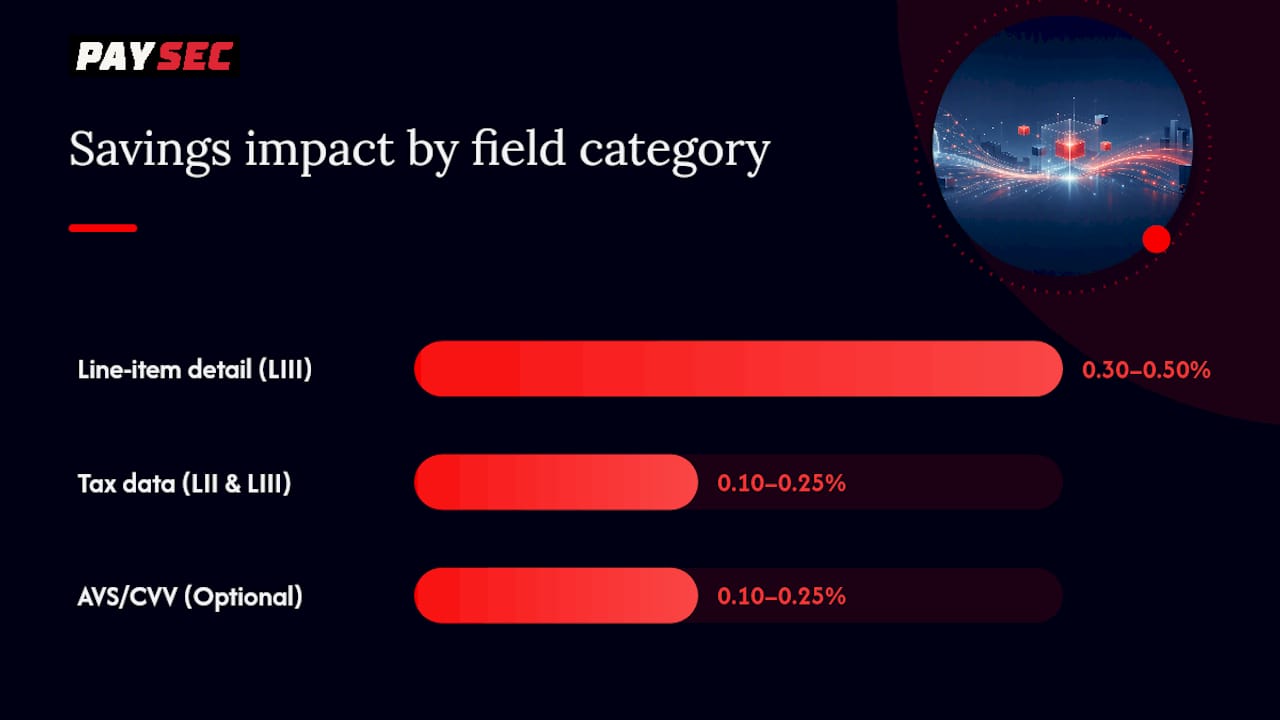
Validation rules trip up more merchants than missing fields do. Postal codes need to match the format the card network expects, commodity codes must follow standard classification systems, and tax amounts can't exceed a small percentage of the total transaction amount or the network flags them as suspicious.
Pro Tip: Run a monthly spot check on 20 to 30 recent transactions against your Level III payload. Formatting drift, a field that quietly stops populating after a system update, is one of the sneakiest ways optimization gains disappear without anyone noticing.
Who Actually Sets Interchange Rates?
Card issuers, the banks that issue your customers' cards, set base interchange rates, but they do so within a framework published by the card networks. Visa, Mastercard, and American Express each publish program requirements that determine which enhanced-data categories exist and what a transaction must include to qualify.
- Visa's Commercial Enhanced Data Program (CEDP) sets specific field and timing requirements for B2B and commercial card transactions, replacing older Level 2 program language with more detailed formatting rules.
- Mastercard's enhanced-data programs run in parallel, with their own field specifications, meaning a payload built for Visa compliance won't automatically satisfy Mastercard's requirements.
- American Express maintains separate optimization criteria, often requiring direct integration through its own network rather than routing purely through standard acquirer channels.
Every network cares about timing. A transaction that qualifies on data content but settles outside the network's window, often batching after a 5 to 6 PM Eastern cutoff, can still downgrade regardless of how complete the payload was. Program rules change periodically too, which is one reason optimization works best as an ongoing operational discipline rather than a one-time integration project.
Which Industries Get the Most Value From Optimizing Interchange?
Not every business sees the same upside, and knowing where you fall on this spectrum helps you prioritize the engineering effort.
- B2B purchasing and corporate cards: the highest-impact category, since these transactions naturally carry the tax, PO, and line-item data Level III requires.
- Wholesale and distribution: high transaction values combined with itemized invoicing make Level III qualification straightforward once the ERP is mapped correctly.
- SaaS platforms billing large invoices: recurring, high-value B2B billing benefits enormously from Level II qualification at minimum, Level III where line-item detail exists.
- Travel and hospitality: big-ticket bookings with supplemental authorizations (final charges differing from initial holds) see meaningful savings when the enhanced-data flow is built correctly.
- Government and education sales: procurement-heavy purchasing patterns with PO numbers already baked into the process make these an easy fit for Level II/III capture.
An illustrative example: a wholesale distributor processing $500,000 a month in card volume, shifting even half of that to Level III, could see monthly savings in the range implied by the 0.30% to 0.50% per-transaction benefit, which adds up meaningfully over a year.
Lower-impact cases exist too. Small consumer retail, restaurant tabs, and micropayments rarely carry the tax or line-item structure that Level II/III rewards, so the engineering investment there usually isn't worth prioritizing compared to a B2B-heavy portfolio.
How Do You Implement Interchange Optimization Step by Step?
Rolling this out is a cross-functional project touching payments, engineering, and finance. Here's the order that works:
- Scope eligible transactions. Identify which portion of your volume is B2B, invoice-based, or otherwise likely to qualify for Level II/III.
- Map fields from your ERP or checkout. Determine where tax amount, PO number, and line-item data already live in your system, and where they're missing.
- Integrate with your gateway or processor's API. Most modern gateways support enhanced-data transmission, but the field mapping has to be built explicitly; it rarely works out of the box.
- Add tokenization and security controls. Enhanced data often includes customer identifiers, so tokenizing sensitive fields keeps you aligned with PCI requirements while you build.
- Test in a sandbox environment. Submit sample Level II and Level III payloads and confirm the processor returns the expected qualification response before going live.
- Run a pilot on a subset of transactions. Start with your highest-ticket, most data-rich transaction type to validate real savings before a full rollout.
- Roll out and monitor continuously. Track qualification rates weekly at first, then monthly once the system stabilizes.
Testing deserves its own attention. Build test cases that check both authorization-stage and settlement-stage field validation, since a payload that passes authorization can still fail at settlement if a field format changes downstream. Your reconciliation test plan should confirm that the interchange rate billed on your processor statement matches the rate your enhanced data should have earned.
- Compare processor statement qualification codes against your internal transaction log monthly.
- Flag any transaction where the billed rate is higher than the expected rate for its data profile.
- Track this discrepancy as a percentage of total volume to catch systemic issues early.
Pro Tip: Map interchange qualification flags on your processor statement directly to your invoicing system before you go live, not after. Retrofitting reconciliation is far more painful than building it into the pilot phase.
What Causes Transactions to Downgrade or Fail Optimization?
Even well-built systems run into recurring failure modes, and most of them are catchable if you know where to look.
- Missing or malformed fields: a tax amount field that's blank, or a postal code in the wrong format, is the single most common downgrade trigger.
- Late batching: settling outside the network's daily window, often 24 hours or less for full qualification, pushes transactions into mid-qualified or non-qualified pricing regardless of data quality.
- AVS/CVV mismatches: address verification and card-security-code failures can strip qualification even when Level III data is otherwise complete.
- Incorrect merchant category codes (MCCs): an MCC that doesn't match your actual business activity can block eligibility for certain enhanced-data programs entirely.
- Manual entry errors: card-not-present transactions keyed in manually are especially prone to formatting mistakes that automated checkout flows avoid.
Operational red flags worth watching for include a recurring downgrade code that shows up on the same days each month (often tied to a batch job that runs late on weekends), or a mismatch between what your authorization payload sends and what actually reaches settlement, frequently caused by a gateway that silently strips fields it doesn't recognize.
The gap between what a transaction was authorized with and what actually reaches settlement is where most invisible downgrades happen. If your authorization payload includes full Level III data but your settlement batch doesn't match it field for field, you're paying for data you already collected and never used.
Follow your card network's formatting specifications and PCI DSS requirements when handling any of this data; that single discipline prevents the majority of compliance headaches before they start.
How Do You Measure and Report Interchange Savings?
Proving ROI requires tracking the right metrics consistently, not just checking a processor invoice once a quarter.
The core metrics worth tracking:
- Percentage of eligible transactions passed as Level II or Level III, tracked monthly against your total eligible volume.
- Downgrade rate, the share of transactions that should have qualified but didn't.
- Average basis-point savings across your optimized transaction set.
- Annualized dollar savings, calculated by applying your basis-point improvement to your yearly card volume.
- Authorization-to-settlement lag, since delays here directly predict downgrade risk.
A useful reporting structure includes these fields at the transaction level:
| Report field | Purpose |
|---|---|
| Transaction ID | Ties the record to your internal invoice or order |
| Card type | Determines which interchange program applies |
| MCC | Confirms program eligibility |
| Authorization payload indicator | Flags whether enhanced data was sent at authorization |
| Settlement payload indicator | Flags whether enhanced data survived to settlement |
| Interchange rate billed | The actual rate charged on the statement |
| Expected rate | What the transaction should have qualified for based on its data |
Build a monthly audit routine: pull the report, flag any transaction where the billed rate exceeds the expected rate, and route exceptions to your payments ops team for investigation. Set a KPI threshold, for example, a downgrade rate above a set percentage of eligible volume, that automatically triggers a deeper review rather than waiting for a quarterly finance meeting to catch it. Tools like PaySec's reporting dashboards are built specifically to surface this kind of transaction-level detail in real time, rather than making finance teams reconstruct it from raw statements.
What Do Real Interchange Optimization Results Look Like?
Numbers from actual implementations tell you more than any theoretical savings range.
- A CPA firm implementing PaySec's interchange optimization workflow realized a 38% reduction in processing fees, driven largely by capturing tax and customer-code data on recurring client billing that had previously gone through as standard-rate transactions.
- A wholesale distributor moving eligible transactions to full Level III qualification achieved a 44% reduction in processing-fee costs, largely by mapping existing ERP line-item data directly into the payment flow rather than building new data collection from scratch.
- An auto dealership working with structured enhanced-data capture saved roughly $2,000 per month, a modest-sounding figure that compounds to $24,000 annually with no change to sales volume.
For a mid-market merchant processing $3 million a year in eligible B2B card volume, even a conservative 40 basis-point improvement translates to $12,000 in annual savings, purely from data and timing changes, not from negotiating a new rate with anyone.
How Do You Evaluate an Interchange Optimization Vendor?
Choosing the right partner comes down to a handful of concrete technical and commercial questions.
Ask every vendor you're evaluating:
- Which specific Level II and Level III fields do you support transmitting?
- Do you send enhanced data at authorization, settlement, or both?
- Who owns batch and settlement timing, you or the vendor, and what's the cutoff window?
- Do you provide a sandbox for testing before production rollout?
- What granularity does your reporting offer, transaction-level or aggregate only?
- Is your pricing model interchange-plus, network offset, or flat-rate?
That last question matters more than it seems. Under a flat-rate pricing model, optimization savings flow to the processor, not the merchant, which means a vendor could technically qualify your transactions for Level III and you'd never see a dollar of the benefit on your statement.
Watch for these red flags during vendor evaluation:
- Opaque reporting that shows only a blended rate with no transaction-level breakdown.
- A flat-rate pricing structure that structurally prevents savings from reaching you.
- Inability to transmit full Level III line-item data, only Level II at best.
- No documented support for daily batching discipline or settlement-window management.
- Vague or nonexistent SLA commitments around onboarding timeline and support response.
Realistic timeline expectations: initial integration and field mapping typically take a few weeks depending on your existing ERP or checkout complexity, with measurable savings visible in processor statements within the first one to two full billing cycles after a pilot rollout.
When Should You Build Interchange Optimization In House?
The honest answer depends less on company size and more on how much of your engineering team's time you're willing to spend on ongoing maintenance, because this isn't a "build it once and walk away" project.
Optimization requires continuous attention: network programs update their field requirements periodically, batch timing has to stay disciplined even as your transaction volume grows, and formatting drift can silently erode savings if nobody's watching the reconciliation report. That operational burden is exactly why treating this as a one-time integration rather than an ongoing discipline is the most common mistake merchants make.
DIY makes sense when your checkout or ERP already produces clean, structured line-item data and your engineering team has bandwidth to own the reconciliation process long term. If you're a smaller merchant with a handful of B2B invoices a month and an existing system that already captures tax and PO data cleanly, building the gateway integration yourself is a reasonable lift.
Partnering makes more sense for platforms processing meaningful B2B volume, merchants with limited engineering bandwidth to dedicate to ongoing maintenance, or any business that wants savings realized in weeks rather than a multi-quarter internal build. For merchants in that second category, PaySec's approach, combining Network Offset Pricing with automated Level II/III capture and transaction-level reporting, is built specifically to get measurable savings flowing without requiring a dedicated internal team to maintain it.
Get Started With Network Offset Pricing
Paysec built its interchange optimization approach around one principle: the savings you create through enhanced data should land on your statement, not disappear into a processor's margin. That's the core difference between Network Offset Pricing and a flat-rate plan that structurally keeps optimization gains for itself.
Paysec's platform handles the technical side directly:
- Network Offset Pricing that passes interchange savings back to you instead of absorbing them.
- Automated Level II and Level III capture and transmission, so your team isn't manually building payloads.
- Daily settlement discipline to keep transactions inside network qualification windows.
- Real-time transaction reporting for finance teams who need to reconcile savings against processor statements.
- PCI DSS Level 1 and SOC 2 compliance, built into the platform rather than bolted on.
Merchants across 18+ industries, from CPA firms to wholesale distributors, have used this approach to see measurable reductions in processing costs, with no long-term contract and no minimum volume requirement. If you're processing meaningful B2B or invoice-based card volume, run a free analysis of your current interchange qualification rate through Network Offset Pricing and see exactly where your transactions are leaving savings on the table, or check current wholesale interchange rates to compare against what you're paying today.
Where to Learn More About Interchange and Optimization
- What Is Interchange Optimization? Definition & Guide, a plain-language definition and industry savings context.
- Interchange Fees Explained, background on interchange components and pricing models.
- International Transfer Best Practices, useful context for merchants handling cross-border B2B payments alongside domestic optimization work.
Sources
FAQ
Do Banks Make Money on Interchange Fees?
Card-issuing banks receive interchange revenue on every transaction, which funds cardholder rewards programs and fraud protection, but that revenue is set by network rules, not negotiated bank by bank.
What Is an Example of Interchange Optimization in Practice?
A wholesale distributor submitting full line-item data, item description, quantity, and unit cost, alongside tax amount and PO number qualifies for Level III pricing instead of standard rates, a change that produced 44% processing-fee savings in one documented case.
Why Are Interchange Fees So High for Some Transactions?
Fees run higher when transactions carry minimal data (Level I only), when they're card-not-present with higher fraud risk, or when they fall into premium rewards-card categories that carry higher base rates set by the issuing bank.
Which Card Type Typically Carries the Highest Interchange Rate?
Premium rewards and corporate cards generally carry the highest interchange rates, since issuers price in the cost of rewards programs and enhanced cardholder benefits; qualifying these transactions for Level II or Level III data is one of the few ways merchants can offset that higher base cost.
How Long Does It Take to See Savings From Interchange Optimization?
Most merchants see measurable results within one to two billing cycles after a pilot rollout, though full integration and field mapping typically take a few weeks depending on ERP or checkout complexity.